SkillSelect Moves to ImmiAccount on 28 November: What Happens to Your EOI?
Australia is moving SkillSelect into ImmiAccount on 28 November. Check what happens to submitted EOIs, unfinished drafts and existing visa invitations.
In this guide · jump to a section
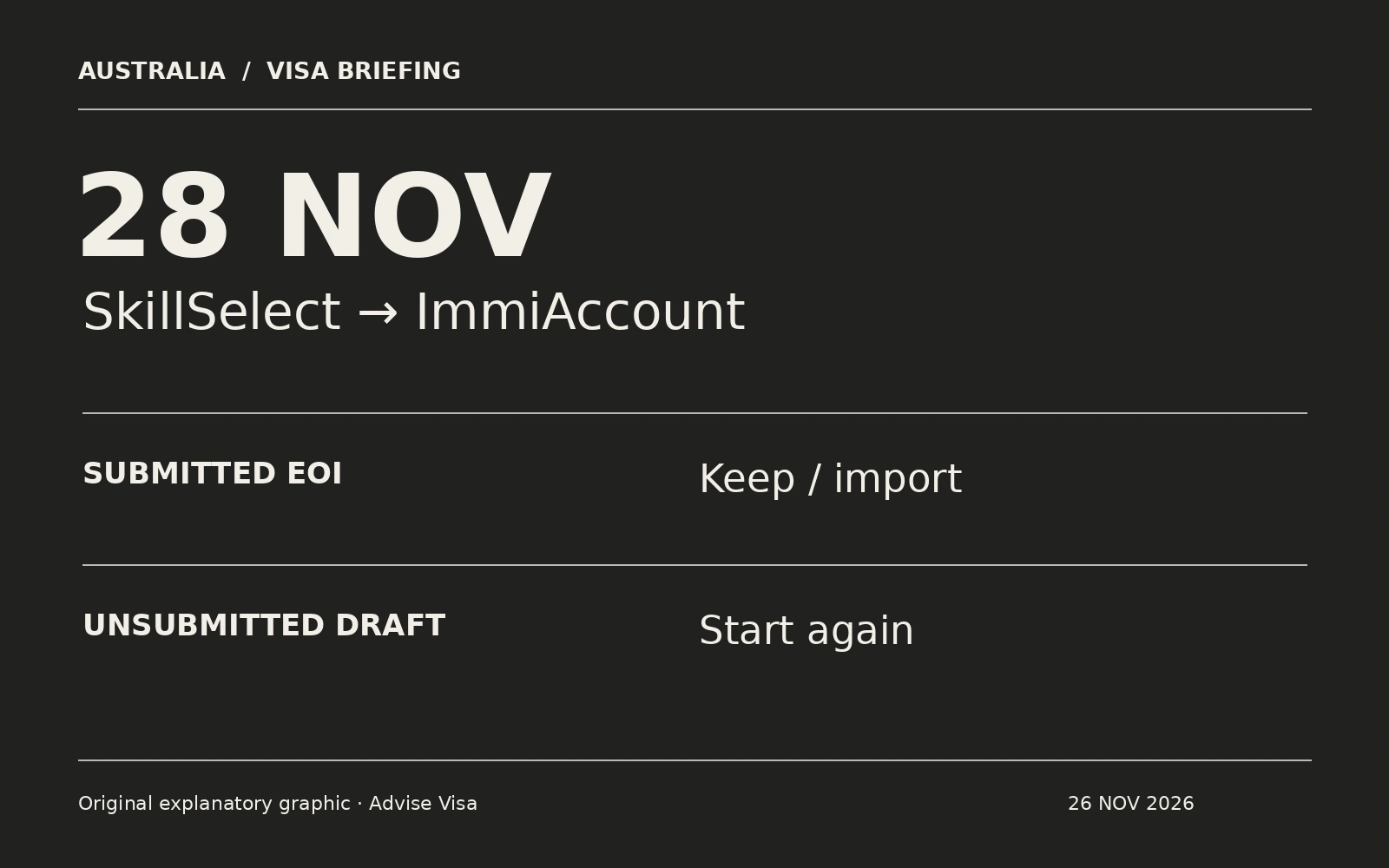
Australia is changing how applicants access SkillSelect, the system used for skilled migration expressions of interest. From 28 November 2026, it will operate through ImmiAccount. For someone waiting for an invitation, the practical question is whether an existing expression of interest, or EOI, needs to be replaced. The answer depends on whether it was actually submitted.
This guide was checked on 26 November, before the scheduled launch. It explains the announced transition and a preparation method; it does not claim the new portal has already opened or that any individual account has migrated successfully.
First establish which record you have
The official migration decision tree separates submitted EOIs from unfinished drafts. Submitted EOIs remain valid and continue to be considered for invitations. Existing invitations will be accessible through the new portal. Drafts that were never submitted cannot be imported and must be started again.
The same guidance identifies 24–27 November as the transition interruption. Therefore, an unavailable screen during that period is not, by itself, evidence that your EOI was rejected. Keep any error message alongside its date and compare it with the published service information before changing your migration plans.
A useful first task is to find your latest correspondence, not your oldest screenshot. Label your record “submitted,” “draft,” or “invited” only when the correspondence supports that description. If you cannot establish its status, record that uncertainty and resolve it through the official account or support route.
Prepare to import a submitted EOI
Home Affairs’ access instructions say to sign into ImmiAccount, choose Import application, and select EOI from SkillSelect. Use the most recent EOI reference together with the matching date of birth, passport country and email address. Confirm the import and inspect the application list.
Each EOI can be imported once. Keep both the previous reference and the new identifier allocated through the new system. If an EOI is already linked, importing it again is unnecessary. The access change does not change skilled visa eligibility, and submitting an EOI remains free.
For your own records, make a small handover sheet with four columns: old reference, current status, account used, and action required. This is particularly useful where a couple has discussed different primary applicants or where an agent has previously managed correspondence. It reduces the chance of confusing two people’s records when the screen layout changes.
An unfinished draft needs different preparation
If your form was saved but never submitted, concentrate on reconstructing accurate answers. Collect your passport, skills assessment, English result and employment chronology in one folder. Make a separate note of answers that require checking rather than copying remembered figures into a replacement form.
For example, an applicant might remember entering four years of employment but later discover that the supporting reference covers a shorter period. Recreating the draft is an opportunity to resolve that mismatch. It is not a reason to preserve an unsupported claim merely because it appeared in the old screen.
Use a simple review order: identity, nominated occupation, qualifications, employment, English and family details. Compare each answer with the relevant document. Save a personal checklist of outstanding evidence so an interruption does not turn an incomplete form into an accidentally submitted one.
Review your circumstances, not just your login
The department’s post-submission guidance says EOIs remain active for two years. Changes can be made before an invitation, including new experience, qualifications, English results, skills assessments and family changes. An invitation is not guaranteed, and an invited EOI cannot be edited in the same way.
Treat the account transition as a reminder to review accuracy. Make a dated list of developments since your last update. Separate “a document has arrived” from “this document changes a claim.” That distinction helps you avoid assuming every new certificate produces extra points.
As an original planning example, imagine an applicant who recently completed another qualification and welcomed a child. Their migration checklist now contains two different questions: whether the qualification supports a changed points claim, and whether family information needs updating. Successfully opening ImmiAccount answers neither question. The underlying record still needs a careful review.
Invitations and lawful stay run on separate clocks
The EOI overview explains that subclass 189, 190 and 491 are points based. The threshold is 65, but reaching it does not guarantee selection. An invitation normally gives 60 days to submit the visa application. Portal migration should not be treated as an automatic extension of an invitation deadline.
For subclass 189, the visa guidance also makes clear that an EOI is not a visa application and does not produce a bridging visa. Applicants must substantiate their invited points and satisfy the remaining criteria.
Put your current visa expiry, any invitation deadline and your planned account check in separate calendar entries. A person can have a valid EOI while their permission to remain in Australia is approaching expiry. Combining those dates under one vague reminder such as “migration renewal” makes an important distinction easy to miss.
A practical check after launch
After 28 November, allow time for a deliberate account review. Confirm the right person’s EOI appears, record its identifier, inspect the status and retain a copy of important correspondence. If information looks wrong, document the discrepancy before making repeated changes.
Use a short issue log: what you expected, what appeared, when it happened and what you have already tried. Keep passwords and security codes out of that log. Precise notes are more useful to support staff than repeated screenshots without context.
Finally, return to the official transition page before acting. A scheduled launch can be accompanied by updated support instructions. This account move is an administrative change; your strongest preparation remains an accurate EOI, traceable evidence and a clear understanding of the separate visa application process.
Sources and verification
- Home Affairs: Accessing SkillSelectimmi.homeaffairs.gov.auRecorded substantive check: 26 Nov 2026
From 28 November 2026 SkillSelect accessed through ImmiAccount; submitted EOIs retained, drafts not migrated; import process and no eligibility change.
- Home Affairs: SkillSelect migration decision treeimmi.homeaffairs.gov.auRecorded substantive check: 26 Nov 2026
24–27 November unavailability, existing invitations remain accessible, submitted EOIs continue considered, new portal from 28 November.
- Home Affairs: After submitting an EOIimmi.homeaffairs.gov.auRecorded substantive check: 26 Nov 2026
EOI active for two years; changes before invitation; no invitation guarantee.
- Home Affairs: Expression of interestimmi.homeaffairs.gov.auRecorded substantive check: 26 Nov 2026
189/190/491 points threshold65 does not guarantee invitation; invited applicants60days to apply.
- Home Affairs: Skilled Independent189immi.homeaffairs.gov.auRecorded substantive check: 26 Nov 2026
EOI does not produce bridging visa; prove invited points and all eligibility requirements.
These are the sources cited for this article. Last article update: 26 Nov 2026. Requirements can change and depend on your nationality and circumstances. This article is general information, not a personal eligibility assessment.
Independent, AI-assisted guidance.Read moreRead less
Use this guide to prepare, then confirm the rules with the responsible authority.
- Last verified against all cited sources
- · Automated source check by AI-assisted source research
- Named immigration-expert review
- Not recorded · Who produces this guide
An article update date is not a source-verification date. A source check is not a guarantee of eligibility or future accuracy.
What this guide adds: Separates submitted EOI, unfinished draft and invited applicant actions; provides a migration preparation worksheet and original examples. Our original explainers